
The Dartfish Padel Match Tagging Guide outlines the standardized workflow for tagging padel matches to ensure accurate, consistent, and high-quality performance analysis and reporting.
Purpose and scope
The guide defines how match data must be entered and how every point should be tagged so that output reports on Dartfish TV are reliable, comparable, and suitable for performance analysis across athletes and teams.
Pre-Match
- Before tagging any points, relevant match information must be inputted to the event, including players, tournaments, and date.
- These must be completed as they are used for filters within the reports when finished and uploaded to Dartfish TV.
- Padel is a doubles sport, both the individuals and pairings should be inputted.
- One team will be designated as the ‘tagged team’, the other team designated as the ‘opponent team’.
- Unless told to make a certain team the tagged team, this is purely so the tagging panel can run as intended.
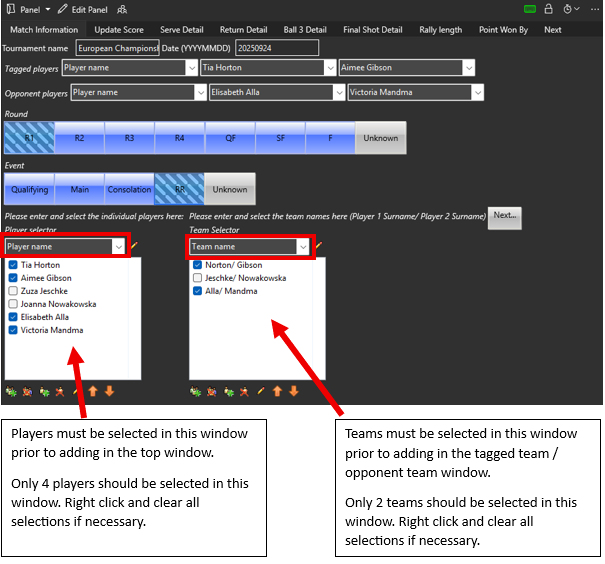
- Ensure that ‘Player name’ database is selected from the dropdown menu for the Player Selector workspace.
- Ensure that ‘Team name’ database is selected from the dropdown menu for the Team Selector workspace.
Players and teams can be added or removed from their respective databases using the following buttons: 
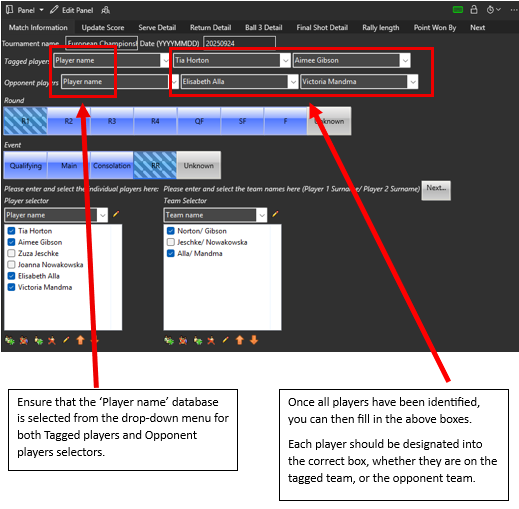
- Once the players have placed in the correct positions, add in the remaining match information. Please ensure the date is entered in the following format: YYYYMMDD
Once you have completed all this information, ensure that the video is at the very start point by pressing the stop button on the media player

Then press the ‘Next’ button to work through the remaining match set-up tags.
Each tab will have one or several trigger keywords that upon pressing will take you to another tab within the tagging panel.
Set
Select the set that is being played
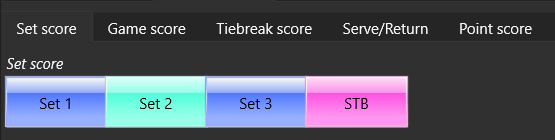
STB = Super Tie Break, some tournaments may have a format where if the match is tied at 1 set all, they will play a first to ten tie breaks as the 3rd set.Game Score
Select the game score. The game score must be from the server’s perspective.
For example, if the server wins the first game of the set (0-0), then the next game is from the opponent’s perspective (0-1).
Serve/ Return
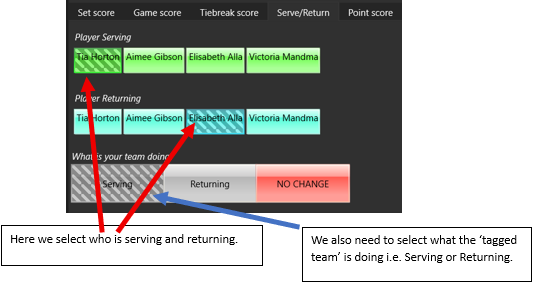
After a point has been played, you will automatically be taken back to this page. If the serving player remains the same, you are only required to change the name of the returning player.
If the role of the team you are tagging does not change, please click on ‘NO CHANGE’.
Troubleshoot: Accidently clicking on Serving or Returning at this point would result in these tags being deactivated and would result in errors in your data output and consequently the match report. If this is done, you can manually click back to the Serve/Return tab to activate the button again
Point Score
Clicking on a Point Score button (e.g. 0-0) will start the recording of your video event.
This will be required before every new point, and like the game score, the scoreline must be from the server’s perspective.
You’ll notice there are options for deuce points, ‘40-40’, DP Deuce, DP Advantage. in some Padel tournaments, they’ll play a Deciding Point at 40-40, but the returning team get to choose which side (Deuce or Advantage) the serve is from. If the serve is from the Deuce side, then select ‘DP Deuce, if the serve is from the Advantage side, select ‘DP Advantage’.
You will now be taken to the Serve 1 Direction tab to start tagging the point.
Tagging a Point
Serve Direction
The first data point to tag in match analysis is the serve direction.
Serve direction is determined by where the ball lands in the box.
The Serve may be In:
- Wide (to outside line of the box)
- Body (to middle of the box)
- T (to inside line of the box)
The Serve may be Out either by:
- Long (past the service line)
- Net (hitting the net)
- Glass (hitting the glass before bounce)
- Centre (landing in the other service box)
Serve errors continue to use Wide, Body, or T to determine their bounce location.
A serve that hits the net and then result in an error should be tagged as net.If the first serve is an error, the panel will automatically trigger to take you to the Serve 2 Outcome tab.
Serve Outcome
On the Serve 1 Outcome you will only be required to state if the serve was ‘In’ or it was an ‘Ace’ i.e. the point continues after the serve or the ball bounced for a 2nd time without the returner hitting it. An ‘Error’ button is hidden and automatically triggered if a Serve 1 Direction error is selected.
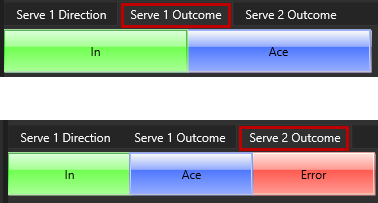
Once a Serve (1st or 2nd) outcome has been tagged as being in, the panel will automatically trigger to take you to the respective Return Detail tabs.
Return Detail
- Return 1 Stroke – either FH (forehand) or BH (backhand)
- Return 1 Type – either Drive or Lob
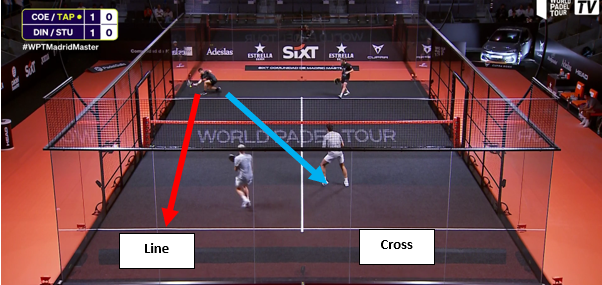
- Return 1 Direction – there are 2 return in directions, line or cross, here you tag where the returner is aiming a return at.
Return 1 Outcome
- In: Ball bounces in the court and the rally continues to the next shot
- Winner: A clean winner where the ball bounces twice before an opponent has an opportunity to return.
- Error: Any error in which the ball does not go in court, both forced and unforced errors fall into this category. Errors include hitting a shot into the net, against the side fence or side / back glass before the ball bounces in court.
Return 2 Outcome:
- In/ Error/ Winner: same definitions as above.
Ball 3 Detail
- Ball 3 Hit By - click on whether this was by the Server or the Server’s Partner
- Ball 3 Stroke - FH (forehand) or BH (backhand)
- Ball 3 Shot Type:
- Groundstroke: A groundstroke shot, usually after the ball has bounced either in court or against the side fence or side / back glass.
- Volley: A shot which is played before the ball bounces in court.
- Overhead: A shot that uses an overhead motion.
- Lob: A shot with the intention of placing the ball over the opponent’s head, forcing them to retreat to the back of the court.
- Ball 3 Overhead Type:
In padel there are many different types of overhead with the main ones defined for tagging.
- Smash – an aggressive overhead shot hit with full power, typically struck at a high contact point, hit with topspin or flat. Intended to finish the point by hitting a winner or forcing an error
- Bandeja – a defensive or neutral overhead shot with underspin or minimal power. Hit to maintain net position and push opponents back, usually landing deep in the court or to the corners
- Vibora – a hybrid overhead shot hit with sliced sidespin, combining control and aggression. Aimed at keeping the ball low and bouncing away from the opponent after the bounce
- Bajada – a counter-attacking overhead shot played after the ball rebounds off the back glass/ wall. Struck with speed or spin, with the goal to turn defence into attack and regain net position
- ‘Other/Unclassified’ - used for when a shot does not fit into the main categories, either because they are rarely used, improvised, or lack clear technical and tactical identity. This may also be used if the match analysis does not require overhead type to be defined.

- Ball 3 Outcome:
In/ Error/ Winner: same definitions as above.
Finish Shot Detail
After Ball 3, you don’t have to tag anything during the point until the final shot of the rally.
You should be counting for rally length during the point, the serving team always hit the odd number in the rally (1,3,5,7 etc.), the returning team always hit the even number in the rally (2,4,6,8 etc.).
- Final Shot Outcome:
- Winner/ Error: same definitions as above
- Final Shot Hit By:
You must click on the name of the player who hits the final shot. The shot will either be a winner or an error. The final shot is the absolute final shot of the rally; there should be no other shots after this one.
- Final Shot Stroke:
- FH: A forehand shot stroke
- BH: A backhand shot stroke
- Final Shot Type:
- Groundstroke: A groundstroke shot, usually after the ball has bounced either in court or against the side fence or side / back glass.
- Volley: A shot which is played before the ball bounces in court.
- Overhead: A shot that uses an overhead motion, like a serve.
- Lob: A shot with the intention of placing the ball over the opponent’s head, forcing them to retreat to the back of the court.
- Final Overhead Type:
If the final shot was an overhead, the Final Shot Overhead tab will be triggered. The same definitions are used as those for Ball 3 Overhead Type
- Rally Length:
The rally lengths are split into categories. If the point has ended during the serve, return, or ball 3, the rally length is tagged automatically.

For rallies 4 shots or more, you are required to tag this information. This is the number of shots hit, not the number of shots hit in. For example, if on the 6th shot in the rally a player hits the ball in the net, the rally length ‘6 to 8’ should be clicked.
- Point Won By:
Select the name of the Team who won the point.
Troubleshoot: If only individual player names are visible, please check that the ‘Team name’ database is selected in the Team Selector on the Match Information tab, and that 2 teams have been selected.
- Next Point
Once you have finished the point, you are then prompted to start the process for the next point in the match.
Clicking on one of these buttons will automatically stop the recording of the event.
If it’s the next point in the game, select next point, this will take you to the scoreline tab.
If the previous point won the game, select next game and this will take you to the game score page. Here you enter the game score (from the new server’s perspective), then who is the new server, returner, and what the team is doing (Serving/ Returning) in the Serve/Return tab.
If the previous point won the set, select next set, this will take you to the set page, here you enter the number of the new set, and then follow the same process as above.
Clicking on ‘End of Match’ will stop the recording of the event and take you back to the Match Information tab.