
The new Channel Admin UI in dartfish.tv keeps the same main administration features while introducing a more modern, more consistent, and more responsive experience. The biggest visible change is the move from the previous top-tab navigation to a single left-side navigation panel, aligned with the UI used in Account Settings. Core areas such as settings, members, collections, sharing, and dashboard templates remain available, but they are now easier to find and easier to use. The redesign also improves readability through clearer summary pages, modernized lists, better visibility of member roles, and improved usability across desktop, tablet, and mobile.
This short video gives you a brief overview of the feature
Purpose and Scope
This article introduces the new Channel Admin interface in dartfish.tv.
It is designed to help channel administrators quickly understand what changed between the previous Channel Admin interface and the new one. The focus is on the main UI, navigation, and usability improvements.
This article does not explain in detail how to manage members, collections, dashboard templates, or channel settings step by step. The main administration features remain broadly the same. What changed most is the way the admin area is organized, displayed, and used.
What you can do
After reading this article, you will understand:
- how the previous and new Channel Admin interfaces differ
- what stayed the same from a functional point of view
- what the main usability improvements are
- how the new layout improves the experience across desktop, tablet, and mobile
Requirements
You must be a channel administrator in dartfish.tv.
Step-by-step guide
Overview: from the previous UI to the new one
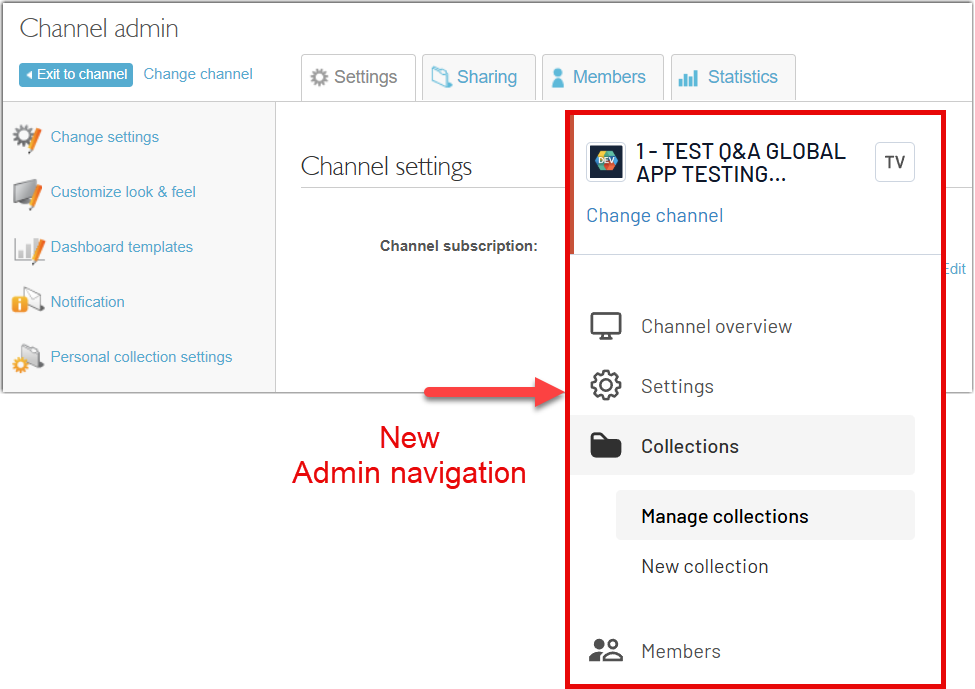
In the previous Channel Admin interface, the main sections were organized with tabs at the top of the page, such as Settings, Sharing, Members, and Statistics.
In the new interface, navigation is now grouped in a single left-side navigation panel. Main admin areas such as Settings, Collections, and Members are easier to find from one consistent place.
This new organization is more modern and more consistent with the UI already used in Account Settings. Users who are familiar with that section should therefore find the new Channel Admin easier to understand and navigate.
in the previous interface, one of the main sections was called Sharing. In the new interface, this area is now presented as Collections.
What stayed the same
The main administration concepts have not changed.
Channel administrators still work with the same core areas, including:
- channel settings
- collections and collection sharing
- members
- PowerBI dashboard templates
- related channel administration options
Responsive design across devices
One of the most important improvements in the new Channel Admin UI is that it is now responsive.
The layout adapts better to different screen sizes, both in width and height. This improves the experience across devices.
On mobile phones and tablets, channel administration is much easier than before.Clearer summary pages
Summary pages in the settings area have been redesigned to improve readability.
Instead of long pages with dense information, the new UI organizes content into clearer blocks. This follows the same design approach as Account Settings.
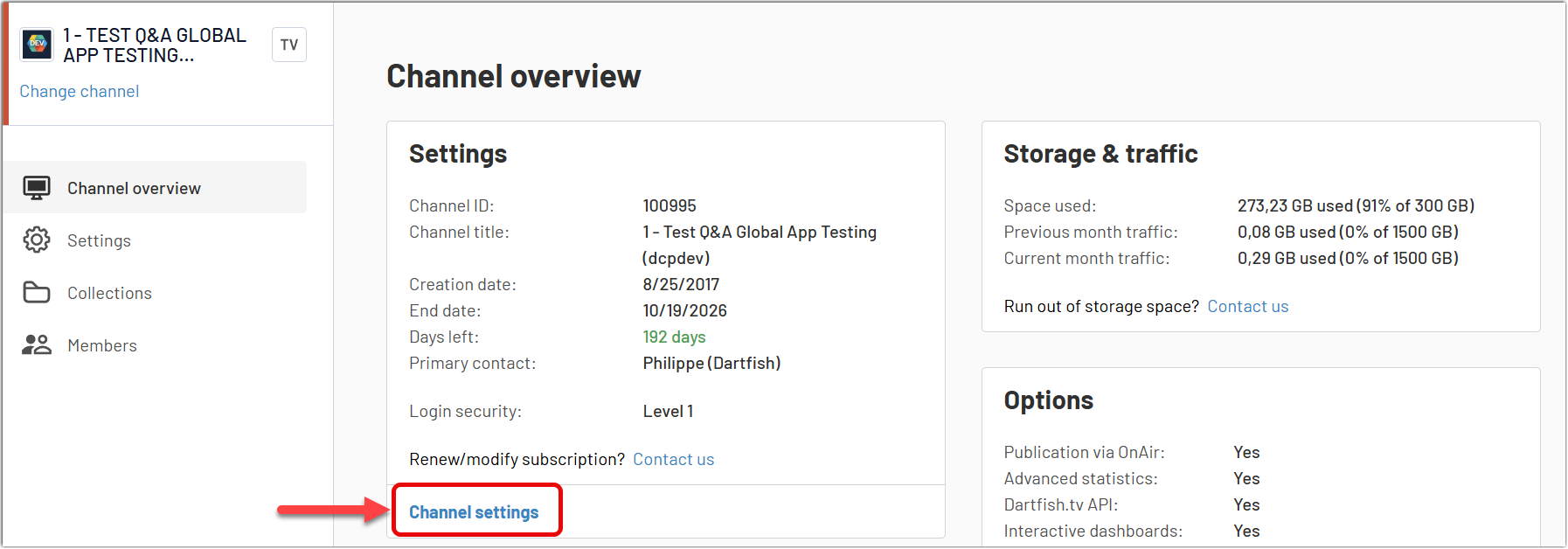
Each block provides:
- a short summary of the current configuration
- a clear link to the related action page
Redesigned lists for members and collections
Lists such as Members and Collections have also been redesigned.
The main logic stays the same. Administrators can still:
- work on one item at a time
- select multiple items and apply bulk actions
This means the redesign does not change how administrators work with lists. It makes those lists easier to read and use.
In the new Members list, a dedicated Role column has been added. This gives administrators an immediate overview of each member’s role and makes the list more useful for quick review and sorting.
Improved Dashboard templates management
The PowerBI Dashboard templates section has also been redesigned with improved ergonomics.
A key improvement is that the action to add a new template is now much more visible, thanks to a clear button placed at the top of the page. In the previous experience, this action was less discoverable, especially when the list was long.
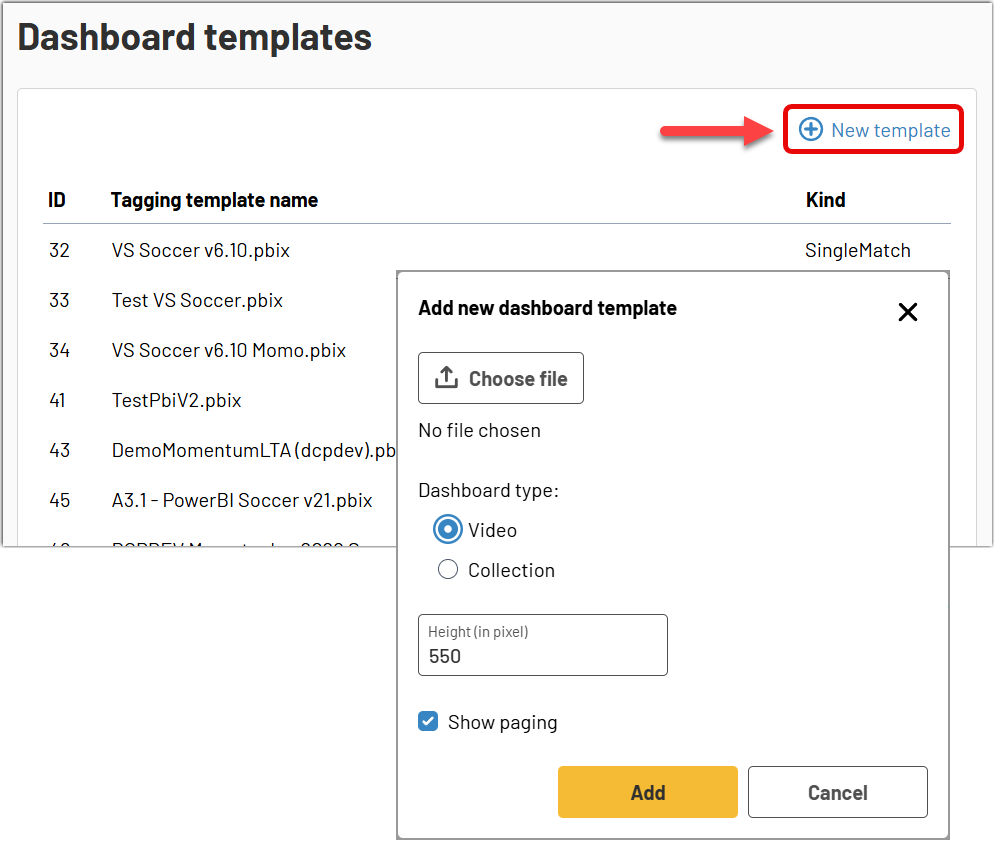
The editing experience has also been improved. Administrators can more easily:
- update an existing template
- delete a template
- review where a template is used
When deleting a template, the interface now gives better visibility into the collections where that template is associated. This helps administrators decide whether to remove the template completely or only remove it from a specific collection.

Tips
- On PC, Shift + mouse wheel can be a convenient shortcut for horizontal scrolling in wide tables.
- Administrators already familiar with Account Settings should find the new Channel Admin easier to understand because it follows the same navigation logic.
- In the Members list, use the visible Role column and filters to review access more quickly.
FAQ
Why does the new Channel Admin look different?
The interface has been redesigned to provide a more modern, more readable, and more consistent experience across dartfish.tv.
Did the administration features change?
The main administration concepts remain broadly the same. The biggest changes are in the UI, navigation, and usability.
Can I still manage members, collections, and dashboard templates?
Yes. These core admin areas are still part of Channel Admin, as also shown in the previous draft.
Is the new interface better on mobile and tablet?
Yes. One of the main improvements is that the new interface is responsive and adapts much better to different screen sizes.